

Have you ever come across an image online and wondered where it came from, who created it, or whether it’s authentic? Maybe you found a product photo and wanted to buy the same item, or perhaps you needed a higher-quality version of an image for research or design work. This is where image search techniques become incredibly useful.
Unlike traditional keyword searches, image search allows you to find information using a picture instead of text. Modern search engines and AI-powered visual recognition tools can identify landmarks, products, plants, animals, and visually similar images within seconds.
Whether you’re a student, content creator, digital marketer, photographer, online shopper, journalist, or simply curious, learning effective image search techniques can save time and help you find more accurate results.
In this guide, you’ll learn how image search works, when to use it, and the best techniques professionals rely on to locate images, verify authenticity, and discover related visual content.
What Are Image Search Techniques?
Image search techniques are methods of finding information using a picture instead of text. By uploading an image, using a camera, or pasting an image URL, you can identify objects, locate similar images, verify authenticity, find original sources, and discover related visual content using AI-powered search tools.
Search engines analyze various visual elements such as:
- Colors
- Shapes
- Patterns
- Objects
- Faces (where supported)
- Text inside images
- Image metadata
- AI-recognized features
The system compares these characteristics against billions of indexed images to return visually similar matches or identify the exact source.
For example:
- Upload a picture of a flower to identify its species.
- Search for a pair of shoes seen on social media.
- Verify whether a news image has appeared elsewhere.
- Find a larger or watermark-free version of an image.
- Discover websites using your original photographs.
Today’s AI-powered visual search has become far more accurate than earlier reverse image search methods, making it easier to identify images even if they’ve been cropped, resized, or slightly edited.
How Does Image Search Work?
Although different search engines use different algorithms, the basic process is similar.
Step 1: Image Processing
The search engine examines the uploaded image and identifies key visual elements, including:
- Object shapes
- Colors
- Textures
- Edges
- Text inside the image (OCR)
- Recognizable landmarks
- Logos
- Products
- Faces (subject to privacy policies)
Step 2: Feature Extraction
Instead of matching every pixel, advanced AI models convert the image into mathematical features that represent its visual characteristics.
This allows the system to recognize similar images even if they have been:
- Cropped
- Rotated
- Compressed
- Slightly edited
- Brightened
- Resized
Step 3: Database Comparison
The extracted features are compared with billions of indexed images stored across the web.
Step 4: Ranking Results
Finally, the search engine displays:
- Exact matches
- Similar images
- Related websites
- Shopping results
- Visually similar products
- Additional context about the image
Modern AI image recognition continues to improve because machine learning models are trained on enormous image datasets.
Why Learn Image Search Techniques?
Many people associate image search with finding similar pictures, but its applications extend much further.
Here are some practical uses:
Verify Fake Images
Journalists and researchers often use reverse image search to determine whether a viral image is genuine or taken out of context.
Find Original Sources
Instead of relying on reposts, image search helps locate the original creator or website where the image first appeared.
Identify Products
Found an attractive chair, watch, handbag, or gadget? Image search can help locate online stores selling the same or similar products.
Identify Plants and Animals
Nature enthusiasts frequently use visual search to recognize unknown flowers, birds, insects, and trees.
Discover Higher Resolution Images
Designers often need larger or better-quality versions of existing images.
Detect Copyright Infringement
Photographers can track where their work appears online and identify unauthorized use.
Improve Academic Research
Students can verify diagrams, historical photographs, maps, artwork, and scientific illustrations more efficiently.
Benefits of Using Image Search
Saves Time
Instead of guessing keywords, you simply upload an image and receive relevant results within seconds.
Improves Accuracy
Visual recognition often identifies objects that are difficult to describe with words.
Enhances Shopping
Many retailers now support visual search, allowing shoppers to upload product images instead of searching manually.
Helps Detect Misinformation
Reverse image search is a valuable fact-checking tool that helps determine whether images have been altered, reused, or misrepresented.
Supports Content Creation
Bloggers, marketers, and designers can locate image sources, verify licensing, and find inspiration responsibly.
1. Reverse Image Search
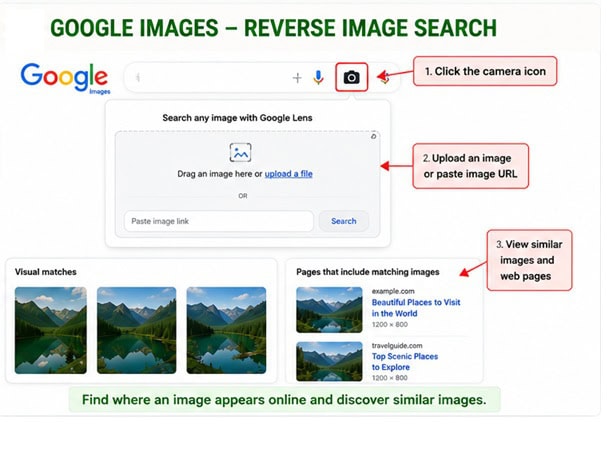
Reverse image search remains one of the most popular image search techniques.
Instead of entering text, you upload an image or paste its URL.
The search engine attempts to locate:
- Exact matches
- Similar images
- Original source pages
- Different resolutions
- Websites using the image
Best Uses
- Fact-checking
- Copyright verification
- Finding original creators
- Tracking image usage
- Locating better-quality versions
Example: Suppose you find a travel photograph on social media without any location mentioned. Uploading it through a reverse image search tool may reveal that it depicts Santorini, Greece, along with blog posts, travel guides, and related images.
2. Search Using Google Lens
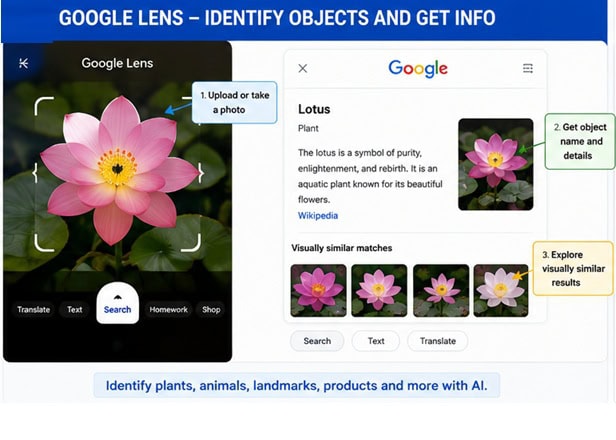
Google Lens combines AI with image recognition to understand what appears in a photo.
Instead of simply matching images, Lens identifies:
- Objects
- Products
- Buildings
- Animals
- Plants
- Food
- Text
- QR codes
- Mathematical equations
It also allows users to copy text directly from images or translate foreign-language signs instantly.
Best For
- Shopping
- Education
- Travel
- Everyday object identification
Practical Example: Take a photo of an unfamiliar flower during a hike. Google Lens can identify the species and provide care tips, related articles, and similar plants.
3. Upload an Image Instead of Typing Keywords
Many search engines allow direct image uploads.
This approach works well when you don’t know how to describe what you’re looking for.
Rather than typing a long description, simply upload the image. The search engine understands visual details more accurately than lengthy keyword descriptions.
4. Search by Image URL
If the image already exists online, copying its URL is often faster than downloading and uploading it.
Simply paste the image address into a supported reverse image search tool.
This method is useful for:
- News verification
- Blog research
- Product images
- Social media posts
5. Crop the Image Before Searching
One of the most overlooked image search techniques is cropping unnecessary elements.
If a photo contains multiple objects, crop everything except the item you want to identify. Removing distractions helps AI focus on the correct subject and often improves search accuracy.
6. Use Multiple Image Search Engines
No single search engine indexes every image available on the internet.
Professional researchers compare results from multiple visual search platforms because each has unique strengths. One tool may excel at product recognition, while another performs better for landscapes, artwork, or historical photographs.
7. Search for Higher-Resolution Versions
Sometimes the image you find online is too small for presentations, printing, or design work.
Instead of settling for a low-quality copy, use reverse image search to locate larger versions of the same image.
This technique is especially useful for designers, publishers, researchers, students, and marketing professionals.
Note: Finding a higher-resolution image does not automatically grant permission to use it. Always check licensing terms or obtain permission from the copyright holder before publishing or reusing an image.
8. Use AI-Powered Visual Search
Artificial intelligence has transformed the way image search works. Unlike traditional reverse image search, AI-powered visual search understands the content within an image rather than simply looking for identical copies.
For example, imagine you upload a photo of a modern living room. An AI-powered search tool can recognize individual elements such as the sofa, coffee table, wall art, plants, and lighting fixtures. It may then suggest visually similar products or provide ideas for decorating your own space.
This technology is especially useful for:
- Online shopping
- Interior design inspiration
- Fashion recommendations
- Product discovery
- Educational research
As AI models continue to improve, visual search is becoming more accurate at identifying objects even when images have been edited or partially obscured.
9. Search Using Screenshots
Many people assume image search only works with original photographs, but screenshots can also produce excellent results.
Suppose you see a pair of sneakers in a YouTube video or a unique chair in an Instagram Reel. Instead of searching with vague descriptions, take a screenshot and upload it to an image search tool.
To improve accuracy:
- Crop out unnecessary interface elements.
- Focus on the main object.
- Use the highest-quality screenshot possible.
- Avoid blurry captures.
This technique is particularly useful for identifying products featured in videos or social media posts.
10. Extract Text from Images (OCR)
Modern image search tools often include Optical Character Recognition (OCR), which detects and extracts text from images.
OCR can recognize:
- Book titles
- Street signs
- Business cards
- Menus
- Posters
- Receipts
- Documents
- Presentation slides
For instance, if you photograph a restaurant menu in another language, OCR can extract the text and even translate it into your preferred language.
Students, travelers, and professionals frequently use OCR to save time when working with printed information.
11. Analyze Image Metadata (EXIF)
Many digital photos contain hidden information known as EXIF (Exchangeable Image File Format) metadata.
Depending on the device and settings, EXIF data may include:
- Camera model
- Lens information
- Date and time
- GPS coordinates
- Exposure settings
- Image resolution
Checking metadata can provide valuable context, especially for photographers, journalists, and investigators.
Keep in mind that many social media platforms remove EXIF data when images are uploaded, so it may not always be available.
12. Search Similar Products
Visual shopping has become one of the fastest-growing uses of image search.
Instead of typing long product descriptions, simply upload a picture of an item you like.
Image search can help you find:
- Clothing
- Shoes
- Watches
- Furniture
- Electronics
- Home décor
- Accessories
For example, if you see an elegant dining chair in a hotel lobby, taking a photo and searching visually may reveal retailers selling the same or similar design.
This approach often delivers faster and more relevant shopping results than keyword searches.
13. Identify Landmarks and Places
Travelers often encounter beautiful locations without knowing their names.
By uploading a photo of a monument, mountain, beach, or historical building, visual search tools can identify:
- Famous landmarks
- Tourist attractions
- Museums
- Natural parks
- Historic sites
Many services also provide:
- Visitor information
- Opening hours
- Nearby attractions
- Maps
- Reviews
This makes image search a valuable companion while traveling.
14. Find Copyright Information
Content creators should always verify image ownership before using photographs found online.
Reverse image search can help locate:
- The original photographer
- The first published version
- Licensing information
- Stock image providers
- Websites using the same image
If you plan to use an image commercially, always review its license or obtain permission from the copyright owner.
Respecting copyright not only avoids legal issues but also supports photographers and artists.
15. Combine Multiple Search Techniques
Experienced researchers rarely rely on a single method.
Instead, they combine several techniques to improve accuracy.
A practical workflow might look like this:
- Crop the image to focus on the subject.
- Run a reverse image search.
- Try an AI-powered visual search.
- Extract any visible text using OCR.
- Check available metadata.
- Compare results across multiple search engines.
Using multiple techniques often uncovers information that would be missed by relying on just one tool.
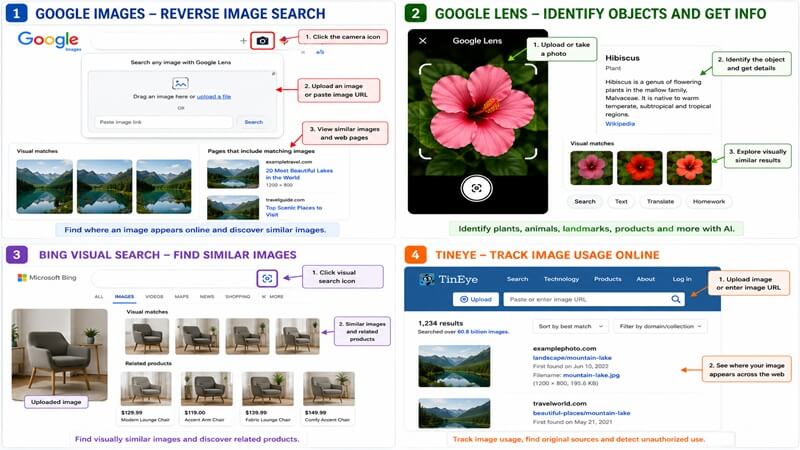
Best Free Image Search Tools
| Tool | Best For | Strengths | Limitations |
|---|---|---|---|
| Google Images | General reverse image search | Large image index, fast results | May not always find the original source |
| Google Lens | Object recognition and shopping | Excellent AI-powered visual identification | Works best with high-quality images |
| Bing Visual Search | Product discovery | Strong shopping integration | Smaller image database than Google |
| TinEye | Finding exact image matches | Excellent for image tracking | Limited object recognition capabilities |
| Yandex Images | Similar image matching | Often finds visually related images | Interface may differ by region |
No single image search tool is perfect. Comparing results from multiple services often produces the most complete and accurate findings.
Google Lens vs. Reverse Image Search
Although these terms are often used interchangeably, they serve different purposes.
Google Lens
Google Lens focuses on understanding what appears inside an image.
It is particularly effective for:
- Identifying objects
- Recognizing plants and animals
- Translating text
- Shopping
- Finding local landmarks
Reverse Image Search
Traditional reverse image search focuses on locating copies or visually similar versions of an image.
It is ideal for:
- Finding the original source
- Detecting image reuse
- Verifying authenticity
- Discovering higher-resolution versions
For the best results, many professionals use both techniques together depending on the search objective.
Common Mistakes to Avoid
Even advanced image search tools can produce poor results if the input image isn’t suitable.
Using Low-Quality Images
Blurry or heavily compressed photos reduce recognition accuracy.
Including Too Many Objects
Busy backgrounds make it harder for AI to identify the primary subject.
Ignoring Cropping
Removing unnecessary elements before searching often improves search precision.
Relying on a Single Tool
Different search engines index different images. Comparing multiple services frequently uncovers additional results.
Assuming Every Match Is Correct
Always verify information using reliable sources, particularly when researching news images or checking authenticity.
Expert Tips for Better Image Search Results
Follow these practical tips to improve your visual search results:
- Use high-resolution images whenever possible.
- Crop images to highlight the main subject.
- Try both reverse image search and AI-powered visual search.
- Search across multiple image search engines.
- Use OCR when visible text appears in an image.
- Check metadata whenever the original image is available.
- Rotate or crop the image differently if the first search produces weak results.
- Compare findings before making decisions or sharing information.
Developing these habits will help you achieve faster, more accurate, and more reliable image search results.
Frequently Asked Questions (FAQs)
1. What is image search?
Image search is a method of finding information using a picture instead of text. You can upload an image, paste its URL, or use your camera to identify objects, discover similar images, or locate the original source.
2. What is reverse image search?
Reverse image search lets you upload a photo to find where it appears online. It’s commonly used to verify image authenticity, locate higher-quality versions, detect unauthorized image use, or identify the original publisher.
3. Which image search tool is the most accurate?
There isn’t a single tool that’s best for every situation. Google Lens performs well for identifying objects, products, plants, and landmarks, while reverse image search tools are better suited for finding duplicate or similar images. For the most reliable results, try more than one tool.
4. Can I search using a screenshot?
Yes. Screenshots work well for image searches, especially when looking for products, places, or images seen on websites or social media. Cropping the screenshot to highlight the main subject often improves the results.
5. Is image search free?
Most popular image search tools offer free access to their core features. Some professional services provide advanced capabilities through paid plans, but casual users can usually find what they need without paying.
6. Can image search identify people?
Some tools can recognize public figures or suggest visually similar faces, but privacy rules generally limit facial recognition features. Results vary depending on the platform and region.
7. How can I find the original source of an image?
Upload the image to a reverse image search tool and review the oldest or most authoritative matching pages. Comparing results from multiple search engines can also help identify the original publisher.
8. Does cropping affect image search results?
Yes. Cropping an image to focus on the main subject often improves accuracy by removing distracting background elements.
Best Practices for Image Search
Whether you’re researching, shopping, or verifying content, following a few simple habits can improve your results:
- Use clear, high-resolution images whenever possible.
- Crop the image to highlight the subject.
- Compare results across multiple search tools.
- Verify information from reliable sources before drawing conclusions.
- Respect copyright and licensing before reusing images.
- Avoid relying solely on AI-generated suggestions without checking the source.
Common Use Cases
Image search isn’t just for finding similar photos. Here are a few everyday situations where it can help.
For Students
Identify diagrams, artwork, historical photographs, or scientific illustrations for research and academic projects.
For Online Shoppers
Find products from a photo instead of guessing keywords, making it easier to compare prices and discover similar items.
For Content Creators
Locate image sources, verify licensing, and discover higher-resolution versions suitable for blogs, presentations, and social media.
For Journalists
Verify whether viral images are genuine, reused, edited, or shared without proper context before publishing.
For Photographers
Track where original images appear online, identify unauthorized usage, and protect intellectual property.
For Travelers
Recognize famous landmarks, monuments, museums, and tourist attractions by uploading a single photo.
Conclusion
Image search has evolved far beyond simply finding similar pictures. Modern AI-powered visual search tools can recognize objects, extract text, identify landmarks, compare products, and even help verify whether an image is genuine.
By understanding and applying different image search techniques, you can search more efficiently, whether you’re researching a topic, shopping online, creating digital content, verifying information, or discovering the source of an image.
No single technique delivers perfect results every time. The most effective approach is to combine multiple methods, including reverse image search, AI visual recognition, OCR, metadata analysis, and searches across multiple platforms. This improves accuracy and increases the chances of finding the information you need.
As artificial intelligence continues to reshape search technology, mastering these image search techniques will become an increasingly valuable digital skill for students, professionals, marketers, researchers, and everyday internet users alike.
Whether you’re trying to identify an unfamiliar object, verify a viral photo, locate a higher-resolution image, or discover visually similar products, using the right image search strategy can save time and deliver more reliable results.